
How to verify user credentials (token)
Token verification is divided into two modes: local verification and online verification using GenAuth. We recommend local verification of JWT Token, because it can save your server bandwidth and speed up verification. You can also choose to send the token to GenAuth's verification interface for GenAuth to verify and return the result, but this will cause network delays and may have slow requests when the network is congested.
The following is a comparison of the advantages and disadvantages of local verification and online verification:
| Verification speed | Code complexity | Reliability | |
|---|---|---|---|
| Online verification | Slow 🐢 | Simple | Single point of failure risk |
| Local verification | Fast 🐇 | General | Distributed |
Local verification
Verify HS256 algorithm-signed Token using application key
If you directly call login methods (loginByEmail, loginByPhone, loginByUsername) or use OIDC authorization, and the IdToken signature algorithm type is set to HS256, please use this method to verify the Token.
You can get the key in Console > Application > Application Details, as shown in the figure below:
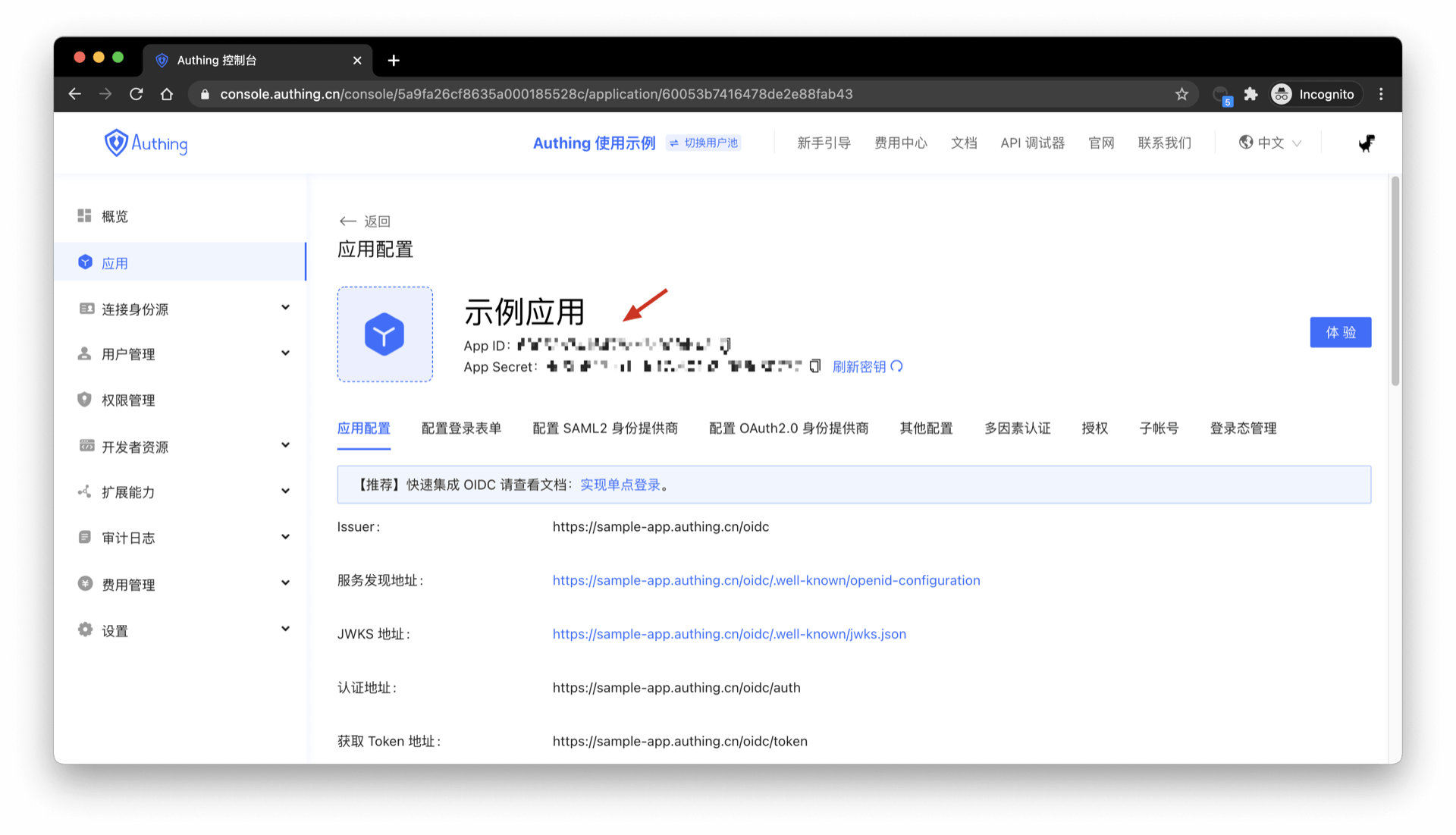
The following code for verifying legitimacy takes Node as an example (JSON Web Token needs to be installed).
const jwt = require("jsonwebtoken");
try {
  let decoded = jwt.verify("JSON Web Token from client", "your_secret"),
    expired = Date.parse(new Date()) / 1000 > decoded.exp;
  if (expired) {
    // Expired
  } else {
    // Legal and not expired, normal release
  }
} catch (error) {
  // Illegal
}
To avoid exposing the application key on the client, verify the legitimacy of id_token through the application key on the server.
Use the application public key to verify the RS256 signature of the IdToken
If you use the RS256 signature algorithm, you need to use the public key to verify the signature. GenAuth will be signed with the application's private key. Please use the public key in https://<app domain name>.genauth.ai/oidc/.well-known/jwks.json to verify the signature. Both the access_token and id_token issued by GenAuth can be verified using the above public key.
If you use javascript, you can use the jose library to verify the RS256 signature:
Please use the jose library of version v2.x.x or below. The new version of the jose library is not compatible with this code example.
const jose = require("jose");
// The following parameters are copied from https://<application domain name>.genauth.ai/oidc/.well-known/jwks.json
const keystore = jose.JWKS.asKeyStore({
  keys: [
    {
      e: "AQAB",
      n: "o8iCY52uBPOCnBSRCr3YtlZ0UTuQQ4NCeVMzV7JBtH-7Vuv0hwGJTb_hG-BeYOPz8i6YG_o367smV2r2mnXbC1cz_tBfHD4hA5vnJ1eCpKRWX-l6fYuS0UMti-Bmg0Su2IZxXF9T1Cu-AOlpgXFC1LlPABL4E0haHO8OwQ6QyEfiUIs0byAdf5zeEHFHseVHLjsM2pzWOvh5e_xt9NOJY4vB6iLtD5EIak04i1ND_O0Lz0OYbuV0KjluxaxoiexJ8kGo9W1SNza_2TqUAR6hsPkeOwwh-oHnNwZg8OEnwXFmNg-bW4KiBrQEG4yUVdFGENW6vAQaRa2bJX7obn4xCw",
      kty: "RSA",
      alg: "RS256",
      use: "sig",
      kid: "TfLOt3Lbn8_a8pRMuessamqj-o3DBCs1-owHLQ-VMqQ",
    },
  ],
});
// The issuer in the options is https://<application domain name>.genauth.ai/oidc, and the audience is the application ID
// id_token is very long, please slide to the right ->
const res = jose.JWT.IdToken.verify(
  "eyJhbGciOiJSUzI1NiIsInR5cCI6IkpXVCIsImtpZCI6IlRmTE90M0xibjhfYThwUk11ZXNzYW1xai1vM0RCQ3MxLW93SExRLVZNcVEifQ.eyJzdWIiOiI1ZjcxOTk0NjUyNGVlMTA5OTIyOTQ5NmIiLCJiaXJ0aGRhdGUiOm51bGwsImZhbWlseV9uYW1lIjpudWxsLCJnZW5kZXIiOiJVIiwiZ2l2ZW5fbmFtZSI6bnVsbCwibG9jYWxlIjpudWxsLCJtaWRkbGVfbmFtZSI6bnVsbCwibmFtZSI6bnVsbCwibmlja25hbWUiOm51bGwsInBpY3R1cmUiOiJodHRwczovL2ZpbGVzLmF1dGhpbmcuY28vdXNlci1jb250ZW50cy9waG90b3MvOWE5ZGM0ZDctZTc1Ni00NWIxLTgxZDgtMDk1YTI4ZTQ3NmM2LmpwZyIsInByZWZlcnJlZF91c2VybmFtZSI6InRlc3QxIiwicHJvZmlsZSI6bnVsbCwidXBkYXRlZF9hdCI6IjIwMjAtMDktMzBUMDc6MTI6MTkuNDAxWiIsIndlYnNpdGUiOm51bGwsInpvbmVpbmZvIjpudWxsLCJlbWFpbCI6InRlc3QxQDEyMy5jb20iLCJlbWFpbF92ZXJpZmllZCI6ZmFsc2UsInBob25lX251bWJlciI6bnVsbCwicGhvbmVfbnVtYmVyX3ZlcmlmaWVkIjpmYWxzZSwibm9uY2UiOiJFNjViMVFvVVl0IiwiYXRfaGFzaCI6IkIzSWdPWUREYTBQejh2MV85cVpyQXciLCJhdWQiOiI1ZjE3YTUyOWY2NGZiMDA5Yjc5NGEyZmYiLCJleHAiOjE2MDE0NTM1NTgsImlhdCI6MTYwMTQ0OTk1OSwiaXNzIjoiaHR0cHM6Ly9vaWRjMS5hdXRoaW5nLmNuL29pZGMifQ.Z0TweYr9bCdYNJREVdvbJYcjXSfSsSNHBMqxTJeW-bnza0IIpBpEEVxlDG0Res6FZbcVzsQZzfJ9pj_nFgLjZxUUxv7Tpd13Sq_Ykg2JKepPf3-uoFqbORym07QEj4Uln0Quuh094MTb7z6bZZBEOYBac46zuj4uVp4vqk5HtCUSB4ASOAxwi7CeB1tKghISHz6PDcf6XJe_btHdzX1dparxtML-KvPxjpcHlt5emN88lpTAOX7Iq0EhsVE3PKrIDfCkG8XlL5y9TIW2Dz2iekcZ5PV17M35G6Dg2Q07Y_Apr18_oowOiQM5m_EbI90ist8CiqO9kBKreCOLMzub4Q",
  keystore,
  {
    issuer: "https://oidc1.genauth.ai/oidc",
    audience: "5f17a529f64fb009b794a2ff",
  }
);
console.log(res);
Output:
{
  sub: '5f719946524ee1099229496b', // Abbreviation of subject, which is the user ID
  birthdate: null,
  family_name: null,
  gender: 'U',
  given_name: null,
  locale: null,
  middle_name: null,
  name: null,
  nickname: null,
  picture: 'https://files.authing.co/user-contents/photos/9a9dc4d7-e756-45b1-81d8-095a28e476c6.jpg',
  preferred_username: 'test1',
  profile: null,
  updated_at: '2020-09-30T07:12:19.401Z',
  website: null,
  zoneinfo: null,
  email: 'test1@123.com',
  email_verified: false,
  phone_number: null,
  phone_number_verified: false,
  nonce: 'E65b1QoUYt',
  at_hash: 'B3IgOYDDa0Pz8v1_9qZrAw',
  aud: '5f17a529f64fb009b794a2ff',
  exp: 1601453558,
  iat: 1601449959,
  iss: 'https://oidc1.genauth.ai/oidc'
}
Online Verification
Online Verification of OIDC AccessToken
Only access_token and refresh_token can detect the status, id_token cannot.
- Interface Description: Check the validity status of the issued
access_tokenorrefresh_token. - Interface address:
POSThttps://<your application domain name>.genauth.ai/oidc/token/introspection - Request header:
| Parameter | Type | Is it required | Description |
|---|---|---|---|
| Content-Type | string | Yes | application/x-www-form-urlencoded |
- Request parameters:
| Parameter | Type | Is it required | Description |
|---|---|---|---|
| token | string | Yes | The token value to be verified. |
| token_type_hint | string | Yes | The token type to be verified. The optional values are access_token and refresh_token. |
| client_id | string | no | Application ID, required when the console configuration verification token authentication method is client_secret_post and none. |
| client_secret | string | no | Application Secret, required when the console configuration verification token authentication method is client_secret_post. |
- Return data:
When the token is valid, the following format is returned
{
  "active": true,
  "sub": "5f623f30d85f84c58f141777", // abbreviation of subject, which is the user ID
  "client_id": "5d01e389985f81c6c1dd31de",
  "exp": 1600634105,
  "iat": 1600274405,
  "iss": "https://oidc1.genauth.ai",
  "jti": "hoV44FPNR-_EfxTP7s7vw",
  "scope": "openid profile email phone offline_access",
  "token_type": "Bearer"
}
When the token is invalid (expired, error, revoked), the following format is returned
{
  "active": false
}
Verify OIDC IdToken online
This interface can detect the validity of access_token and id_token, but refresh_token cannot.
- Interface description: Check the validity status of the issued
access_tokenorid_token. - Interface address:
GEThttps://<your application domain name>.genauth.ai/api/oidc/validate_token - Request parameters:
| Parameter | Type | Required | Description |
|---|---|---|---|
| access_token | string | No | AccessToken content. |
| id_token | string | No | IdToken content. |
- Return data:
When access_token or id_token is valid, return the decoded content of access_token / id_token
// Result returned after access_token verification:
{
    "jti": "K5TYewNhvdGBdHiRifMyW",
    "sub": "5f64afd1ad501364e3b43c1e", // abbreviation of subject, which is user ID
    "iat": 1601456894,
    "exp": 1601460494,
    "scope": "openid profile email phone",
    "iss": "https://oidc1.genauth.ai/oidc",
    "aud": "5f17a529f64fb009b794a2ff"
}

// Result returned after id_token verification:
{
    "sub": "5f64afd1ad501364e3b43c1e", // The abbreviation of subject, which is the user ID "birthdate": null, "family_name": null, "gender": "U", "given_name": null, "locale": null, "middle_name": null, "name": null, "nickname": null, "picture": "https://usercontents.genauth.ai/authing-avatar.png", "preferred_username": "test1", "profile": null, "updated_at": "2020-09-27T06:06:29.853Z", "website": null, "zoneinfo": null, "email": "test1@123.com", "email_verified": false, "phone_number": null, "phone_number_verified": false, "nonce": "CQsguqUdl7",
    "birthdate": null,
    "family_name": null,
    "gender": "U",
    "given_name": null,
    "locale": null,
    "middle_name": null,
    "name": null,
    "nickname": null,
    "picture": "https://usercontents.genauth.ai/authing-avatar.png",
    "preferred_username": "test1",
    "profile": null,
    "updated_at": "2020-09-27T06:06:29.853Z",
    "website": null,
    "zoneinfo": null,
    "email": "test1@123.com",
    "email_verified": false,
    "phone_number": null,
    "phone_number_verified": false,
    "nonce": "CQsguqUdl7",
    "at_hash": "10iOtwuTNtyQLzlNYXAHeg",
    "aud": "5f17a529f64fb009b794a2ff",
    "exp": 1601460494,
    "iat": 1601456894,
    "iss": "https://oidc1.genauth.ai/oidc",
}
When access_token or id_token is invalid, the following error message is returned
{
  code: 400,
  message: 'id_token is invalid',
}

{
  code: 400,
  message: 'access_token is invalid',
}
Verify OAuth2 AccessToken online
- Interface description: can verify
access_tokenandrefresh_token - Interface address:
POSThttps://<your application domain name>.genauth.ai/oauth/token/introspection - Request header:
| Parameter | Type | Is it required | Description |
|---|---|---|---|
| Content-Type | string | Yes | application/x-www-form-urlencoded |
| Authorization | string | No | In the console application configuration details, in the "Configure OAuth2.0 Identity Provider" tab, configure the verification token authentication method to client_secret_basic. It is required to fill in the form: Basic base64 (application ID + ':' + application Secret) |
- Request parameters:
| Parameter | Type | Is it required | Description |
|---|---|---|---|
| token | string | yes | The token value to be verified. |
| token_type_hint | string | yes | The token type to be verified. The optional value is access_token |
| client_id | string | no | Application ID. In the console application configuration details, "Configure OAuth2.0 Identity Provider" tab, it is required when the verification token authentication method is configured as client_secret_post and none. |
| client_secret | string | no | Application Secret. In the console application configuration details, "Configure OAuth2.0 Identity Provider" tab, it is required when the withdrawal token authentication method is configured as client_secret_post. |
- Return data:
When the token is valid, the following format is returned
{
  "active": true,
  "sub": "5dc10851ebafee30ce3fd5e9", // abbreviation of subject, which is the user ID
  "client_id": "5cded22b4efab31716fa665f",
  "exp": 1602423020,
  "iat": 1602419420,
  "iss": "https://core.genauth.ai/oauth",
  "jti": "SaPg48dbO66T77xkT8wy0",
  "scope": "user",
  "token_type": "Bearer"
}
When the token is invalid (expired, error, revoked), the following format is returned
{
  "active": false
}